Ans: No, the Wave browser is not safe to use, as it has been considered a Potentially Unwanted Program and is not considered trustworthy by Windows Defender.
What is Wave Browser, and Why is It a Concern?
POST BY
PUBLISHED
April, 28, 2026
Last month, I was working on my PC, and suddenly it started popping up unnecessary ads, my default search engine got changed, and gradually my system also started lagging.
Then I halted my work, investigated, and found that the Wave browser got installed while I was installing some other program. Without a second’s delay, I uninstalled it, ran a malware check, and reviewed system settings.
If you have also gone through the same situation, then I will assist you in troubleshooting it. Here, I will discuss everything about Wave Browser and will answer all essential queries about it.
Let’s jump into the discussion.
Table of Contents:
What is a Wave Browser?
Wave Browser is a web browser developed by a firm named Wavesor Software. The core purpose of the browser, as mentioned on its homepage, is to utilize the revenue earned to remove plastic and trash from the ocean.
However, it is classified as a PUP (Potentially Unwanted Program) for its unnecessary interference with the system settings and hampering the general system functions.
Most of the time, it gets installed automatically, without the user’s permission, making it a perceivable threat to data security and starts manipulating the system configurations. Even people have reported unusual responses and behavior of this browser as well.
To cut a long story short, is the Wave browser safe to use?
Let’s address this dilemma.
Suggested Read: Why Persistent Network Identity Is Important
Is Wave Browser Safe to Use?
Wave browser is not explicitly declared a virus or malware, but many anti-virus tools detect it as a potential threat and sometimes quarantine its file as well.
When I attempted to download it on my system (having Windows 11), I got the following alert from Windows Defender, which is definitely not good for my system’s health.

Furthermore, Malwarebytes has designated it as a potentially unwanted program (PUP). A PUP poses a considerable threat to the system’s privacy, can compromise device performance, and may also expose the data and the system to security threats.
This directly brings us to the question, “Is Wave Browser a virus?”
Analyzing the facts on the flip side, it has been recognized by the Soundforge software review community and has been awarded an overall 4.9/5 rating.
Though it is not a virus, it can’t be considered completely safe either.
Keeping all these hard facts aside, I have experienced certain issues since it was unknowingly installed in my system. If you have also encountered such issues, let me take you through the procedure of uninstalling it.
How to Uninstall a Wave Browser?
Here I will explain to you the procedure to uninstall it from your computer system and smartphones to check and ensure it won’t harm your device.
1. Windows:
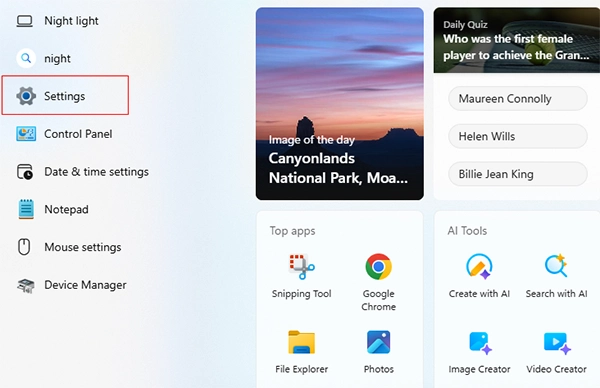
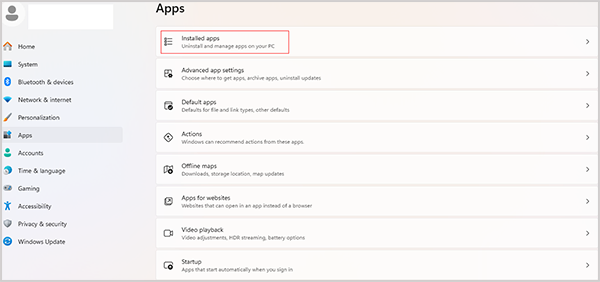
- Go to the “Start Menu” and go to “Windows Settings.”
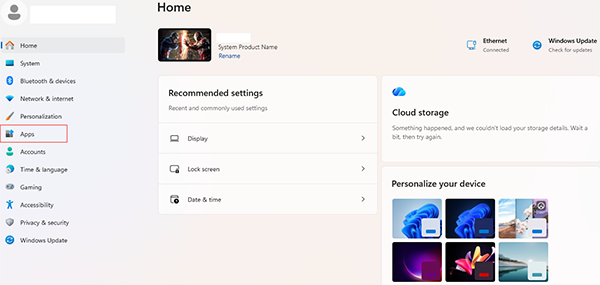
- Navigate to the “Apps” tab on the left of the screen.
- Click on “Installed Apps.”
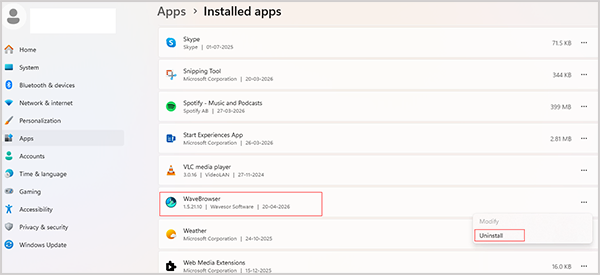
- Find “Wave Browser” and click on “Uninstall.”
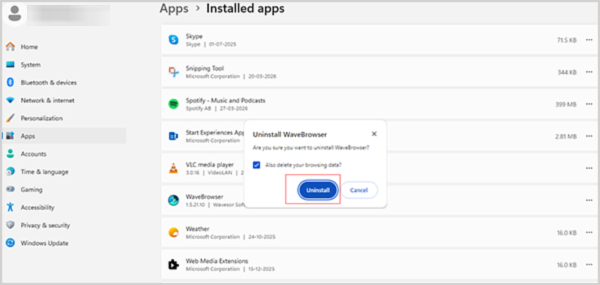
- Now, click on “Uninstall” to delete it from the system.
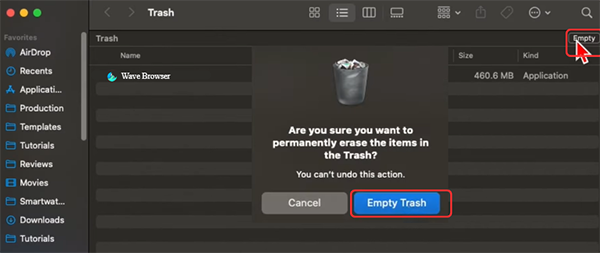
2. Mac:
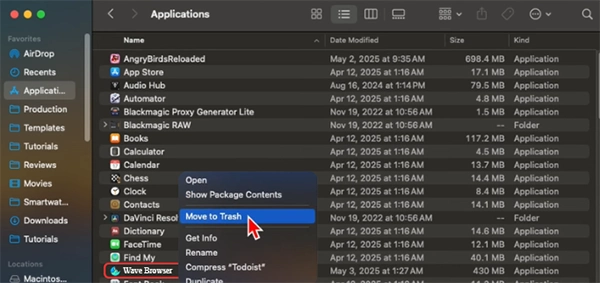
- Go to the “Finder” icon in the dock at the bottom and click on the “Applications” tab on the left.

- Now, click on the “Wave Browser” and click on “Move to Trash.”
- Now, go to the “Trash Panel” by navigating to it through the dock.

- Now, click on the “Empty” button in the top right corner and then click on “Empty Trash” in the dialogue box.
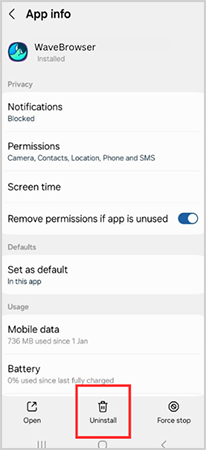
3. Android:
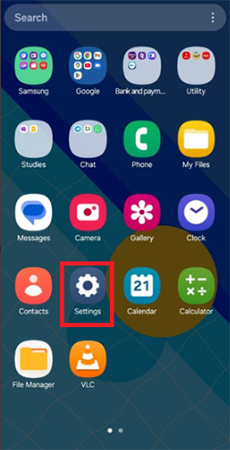
- Go to the “Settings” in your icon menu.
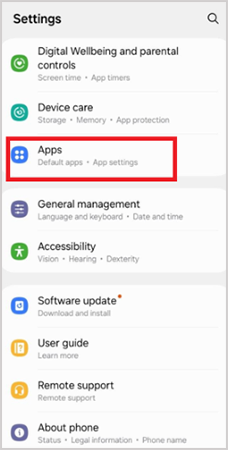
- Now go to the “Apps” section.
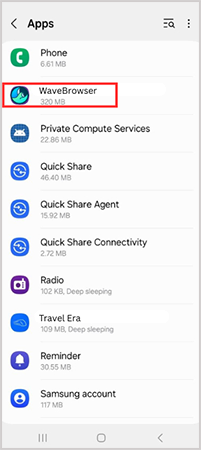
- Select the “Wave Browser”.
- Tap on “Uninstall” at the bottom of the screen.
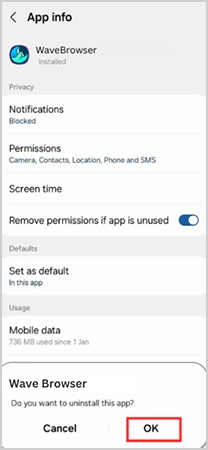
- Now tap on “OK” in the dialogue box that appears.
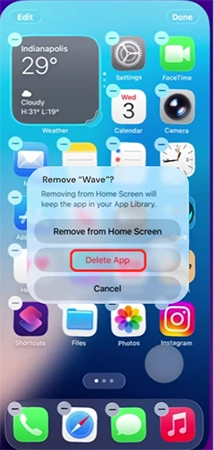
4. iPhone:
- Press anywhere on the blank space on your screen in the icon menu for a few seconds.
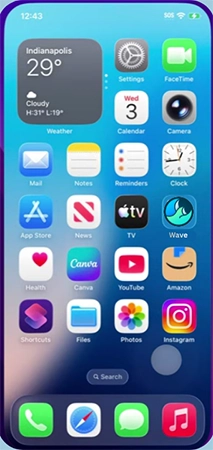
- As the icons start to wobble, press the “
” appearing over the Wave browser’s icon.
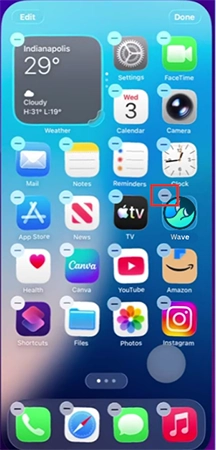
- Now tap on “Delete App” to uninstall it from your iPhone.
How Does the Wave Browser Get Installed?
There are 2 ways the Wave browser gets installed in your system. One is that you download its installer from the official website and install it at your will. The second is when it embeds itself with another reputed programme and gets installed without letting you know.
This second situation has been encountered by many users, and I am providing here a case that I found on Reddit.
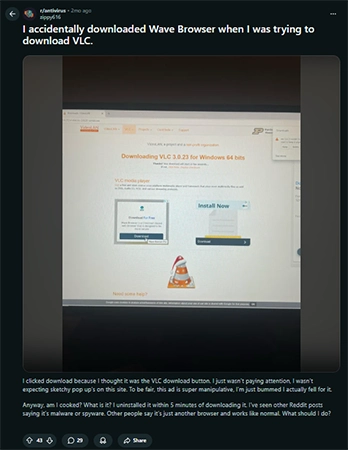
I have found that it gets automatically installed on your system in the following ways:
- Deceptive Techniques: Some websites show bold ads on their pages with “DOWNLOAD” prominently written on them. This draws the user’s attention who clicks it, unaware of where that click takes him/her, and the browser starts installing. I have experienced such situations while accessing torrent sites through VPNs.
- Software Bundling: While installing some genuine and authentic software, it may come embedded with it, like an optional app, and get installed with the core program.
- Fake Promotions: Some YouTube channels and webpages have promoted it to a level where the users get trapped and manipulated into installing it.
If you downloaded it intentionally, then there is no question about why you are getting pop-ups and system lags. But if it got downloaded in the background, then how can you find out it got into your system?
Here is how to deal with it.
How to Detect the Wave Browser in My System?
Most of the time, the Wave browser gets installed on your system, and you just observe some unusual responses without understanding the underlying cause.
So, here are simple ways to detect if the Wave browser is installed in your system.
- Inspect the Installed Application: The simplest way is to go to the settings of the PC or smartphone and check the installed apps and programs.
- Check for Unknown Extensions: Sometimes, unfamiliar extensions get installed in your browser toolbar, and they are hard to get rid of. This could have been done by a malicious browser working in the background.
- Atypical System Responses: Getting pop-up ads frequently, experiencing system lags, or random redirection to unnecessary URLs can be a hint that a Wave browser is installed on your device.
Now that you have understood the core factors about it, let me explain to you why you should uninstall it ASAP.
Why Remove Wave Browser From the System?
While researching about this browser, I came across some vital points that I share with you for why you should remove the Wave browser from the system.
- Untrusted Parent Company: This browser is developed by Wavesor Software, which is a subsidiary of Polariy Technologies Ltd, a brand labeled as “a Search Hijacker.”
- Can Cause System Changes: It can also modify your system settings, like changing the default homepage or default browser, thus interrupting your workflow.
- Stimulate Advertisements: Many times, it automatically pops up advertisements, which can be irritating at times.
- Can Pose Risk to Data: It has been reported that this web browser may expose your personal data to cyber theft.
I know, you would have seen many other such unnecessary programs, adwares, or malwares. But if you are oblivious of how to deal with them, let me tell you the same fundamental solutions for it.
Tips to Avoid Suspicious Browsers and Programs
Suspicious apps like Wave Browser not just inflict substantial harm to your system, but also pose a threat to the data stored. Being a VPN specialist and ardent tech geek, I keep on experimenting with newly released apps or the updated versions of the prominent ones, and came to the following inferences.
They can cause minor to severe damage to the device based on the strength and level of infection. Firstly, let’s understand how they can be harmful to your system.
Possible Impacts Of Malicious Apps And Programs
Here are some anticipated impacts of such unwanted apps and programs on your device.
- Data Security: Such malicious apps or malware can sneak into your system and foil your digital privacy.
- High Data Usage: It has been observed that such suspicious apps consume more internet data, which can increase your data bill while simultaneously slowing down the internet speed.
- Slow Down Your System: Regular interference and constant messages or automatic system actions consume the device RAM and storage, which can result in the slowing down of the system.
- Install other Software or Malware: Such suspicious apps or software can open the tunnel for other unwanted apps or malware on your system. This can aggravate the system’s health to a much higher level.
Below are some general points from my side about how to tackle other such apps and software in the future.
How To Avoid Potentially Harmful Programs?
There are certain tried and tested essential cybersecurity tools to get rid of such programs. Still, let me give you some personal tips for it.
During a career of 10 years in the field, I have come across certain nitty-grities that need to be addressed to get rid of such malicious apps, which I am providing below.
- Consider Only Trusted App Stores: The Apple Store, Windows Store, and Google Play Store are highly authentic and dependable sources of downloading software. Only use them to get any app or program.
- Keep The Firewall And Virus Detectors ON: The built-in system security features, like Windows Defender, can work pretty well in counteracting such issues. Keep them active, updated, and working.
- Keep The Device Updated: Make sure your Windows, Mac OS, Android, or iOS is updated with the most recent update package.
- Check for Suspicious Activities and Take Action: Some unusual system responses, like recurring ads or a change of default browser homepage, need to be addressed as soon as possible.
- Read Reviews Before Choosing: Before installing any unknown program, please go through its reviews on YouTube or take a look at the discussions at the Q&A platforms like Quora and Reddit to understand its essence and performance.
- Avoid Clicking Unknown Links: You might find many attractive ads and pop-ups drawing your attention. Refrain from clicking on them to avoid such malicious software.
Conclusion
The above debate would have helped you grasp the understanding of what Wave Browser is and whether it is safe to use. Although it started with a noble cause of bringing conducive environmental change (as mentioned on the official website), it has been bothering the users unnecessarily, which has challenged its acclaimed reputation.
Keeping all the points in mind, I would suggest you go with certain established browsers like Chrome, Firefox, Edge, and Opera, rather than opting for Wave Browser.
Next Read: What is a Remote Access VPN? Understand How They Work and the Best VPN for Remote Access
FAQs
Q: Is Wave Browser safe to use?
Q: Why did Wave Browser get on my computer?
Ans: Wave Browser gets installed on your computer to forcefully expand its user base and promote its free application through deceptive techniques.
Q: Can I delete the Wave browser?
Ans: Yes, you can delete the Wave browser from your Windows, Mac, iPhone, or Android device by going to the “Installed Apps” in the “System Settings,” selecting the “Wave Browser,” and clicking or tapping on “Uninstall.”
Q: Who developed the Wave Browser?
Ans: WaveSor Software has developed wave browsers to support environmentally sound actions and promote ecological sustainability.
Related Posts