Ans: Yes, Surfshark is a fast, reliable, and budget-friendly option that delivers industry-standard features like split tunneling, multi-hop, and kill switch.
Surfshark VPN Review 2025: Is Surfshark a Good VPN?
POST BY
PUBLISHED
September, 16, 2025
Let’s be honest: We do not think about online privacy until we see “content not available” while travelling or when we need to connect with public internet services. And that’s where VPNs serve as a solution to circumvent the geographical restrictions and provide tight and solid online security.
Among many VPNs, Surfshark VPN is the crowd’s favorite with unlimited device connections, strong security features, and a much cheaper cost than big players.
We’ve run a test on speed, features, security, and price to understand: is Surfshark a good VPN? Read this review thoroughly to understand better!
Table of Contents:
Surf Shark VPN: Company Overview
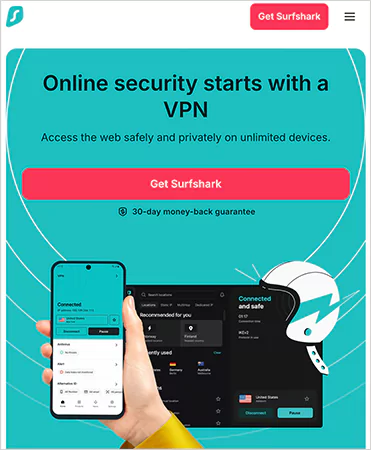
Surfshark was launched in 2018 to provide the highest security, quality, and transparent standards to users. Since the launch, the company and the service have started getting more traction, and they have gone on to launch cybersecurity solutions with Surfshark Alert and Search.
Their security products help people to take control of their digital lives by alerting them to potential threats, and ensuring that to provide resources to fix them. Moreover, the company also follows a “no-logs policy”. Meaning, they do not collect any personal information of the user, just the payment data to track the paying customers and services.
Now that you’re aware of Surfshark’s parent company, let’s go ahead and check out its features.
Surfshark VPN: Features
Considering the price point based on what big VPN services offer, Surfshark is the best. With multiple features and top-notch security, we think one should try Surfshark. But just don’t take our words, check out these features yourselves:
- Unlimited Device Connections: Where other VPN services restrict users to choosing only up to 5–6 devices per account, there’s no restriction with Surfshark. You can connect as many devices as you own and even share the connection with your family members without paying anything extra.
- RAM Only Servers: Conventional VPN servers save information on physical hard drives, which might be accessible if compromised. VPN Surfshark runs on volatile RAM, meaning the data gets erased automatically when the server is turned off or rebooted. This ensures none of the user’s data is left to be confiscated by the predators.
- Camouflage Mode: Many Wi-Fi networks identify and block VPN traffic. That’s why camouflage mode conceals the VPN information and makes sure the encryption tunnel comes across as standard internet traffic. This helps to escape the stringent internet monitoring.
- Clean Web: Surfshark’s CleanWeb functionality acts as an integrated security shield that prevents ads, trackers, and recognized harmful sites from loading at all. This feature helps to enhance speed and eliminate browsing through ads, contain viruses, and phishing links.
- NoBorders Mode: Many countries have strict internet rules. In such cases, NoBorders mode helps to trespass by detecting the region you’re in and switching to allowed servers. You can surf globally, including China, Russia, and the Middle East.
- Kill Switch: VPN connection failing means your online activities and actual IP address are exposed. VPN Surf offers a Kill Switch feature that creates a safety net by disconnecting the internet. This ensures that none of the data is leaked.
- GPS Spoofing (Android Only): Certain apps and websites only allow users after checking their location and IP address. GPS spoofing enables the IP address and VPN server location to match and circumvent the restriction.
- MultiHop: If you want more privacy, Multihop lets you direct your traffic from two channels in different countries, making it difficult to track down your data. This feature is widely used by journalists, activists, or anyone who is in need of strong anonymity.
These are the great features offered by Surfshark VPN Extension, which enhance your privacy, security, and everyday convenience.
Surfshark VPN: Security and Privacy
Talking about privacy, well, that’s a no-brainer. Surfshark is the best VPN for iPhone, Android, desktop, and MacBook and offers unmatched privacy and security performance, which is a total deal-breaker. Let’s get more into it here:
- Encryption: Offers military grade encryption- AES-256-GCM to create a safe tunnel.
- Protocols: Follows WireGuard for better speed, OpenVPN, and IKEv2/IPsec for reliability and protection.
- No-logs Policy: Surfshark does not keep users’ online data, IP addresses, or personal information. This was audited and applauded by Deloitte.
- Temporary Connection Data: When a user activates the VPN service, it logs the user’s data to identify the location and server, and this data is erased within 15 minutes when the connection times out.
Surfshark passes all the DNS, IPv6, and WebRTC leak tests with its short-lived logging and transparency, making it a top choice for people worldwide.
Surfshark Extension Speed Performance
It is a known fact that VPNs slow down slightly during encryption. However, Surfshark has really outshone others. We did a speed performance test, and these are the results based on a 500 Mbps base connection:
| Region | Average Download Speed | Protocol Used |
| US to US | Around 320 Mbps | WireGuard |
| US to UK | Around 280 Mbps | WireGuard |
| US to Asia | Around 210 Mbps | WireGuard |
This speed value is capable of supporting 4K streaming, online gaming, and downloading large files.
Moving ahead in this Surfshark review, let’s go ahead and check out the Surfshark app and accessible devices.
Surfshark Extension: App and Ease of Use
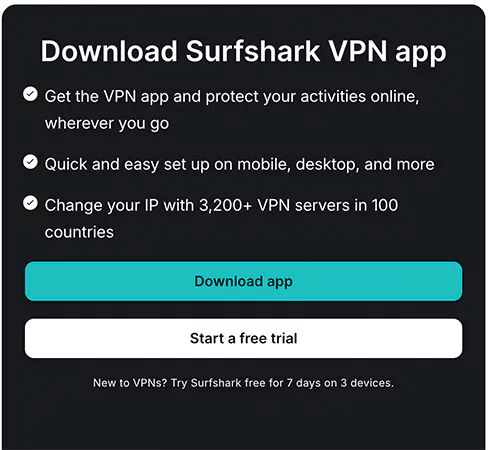
The Surfshark app is designed to offer everything easily and quickly in one place. This app can be used on Android, iOS, MacBook, computer, and Linux. It supports browsers like Chrome, Firefox, and Edge and has a clean, beginner-friendly interface, making it accessible to all kinds of users.
In addition, the dashboard has a quick connect button, server locations, and a settings section to easily switch servers with just a couple of clicks. You can establish unlimited simultaneous connections and integrate them on your smart TVs, game consoles, and routers.
Even the mobile versions offer all the core features of the desktop version, including split tunneling, CleanWeb, multihop, and more. The best part is that the Surfshark app is compact with simple functionality and powerful tools, making it suitable for first-time users and privacy enthusiasts.
Surfshark Pricing
Surfshark’s monthly plan starts at $15.45 per month, which includes all the features. However, we would recommend you take a subscription package as it comes down to much lower fees than a single monthly plan.
Here’s the breakdown of Surfshark pricing and plans:
Surfshark Starter
This one’s a beginner-friendly plan best suited for casual and first-time VPN users.
Monthly cost: $15.45 per month.
12 Months (+3 extra months free) cost: $3.19 per month with an average bill of $47.85.
24 Months (+3 extra months free) cost: $1.99 per month with an average bill of $53.73.
Surfshark One
This plan offers several extra features over the starter plan, which include:
- Antivirus protection.
- Data leaks alert.
- Ad-free search results.
Monthly cost: $17.95 per month.
12 Months (+3 extra months free) cost: $3.39 per month with an average bill of $50.85.
24 Months (+3 extra months free) cost: $2.99 per month with an average bill of $80.73.
Surfshark One+
Surfshark One+ is the most advanced plan the company offers, which is primarily used by industry professional to secure their company data. These are the exclusive features of this plan:
Alternative IDs.
- Data removal from the company’s database.
- Data removal from search sites.
- Dedicated IP address available in 20 locations.
- Virtual or alternative phone number.
Monthly cost: $20.65 per month.
12 Months (+3 extra months free) cost: $6.09 per month with an average bill of $91.35.
24 Months (+3 extra months free) cost: $3.99 per month with an average bill of $107.73.
With each plan, you get a 30-day money-back guarantee in case you don’t like the services. You can even start with a free trial, learn how to set up VPN, and check out all the features for yourself.
Surfshark Vpn Review: Pros and Cons
Now that you’ve got everything straight about this VPN, let’s weigh all the positives and negatives clearly. As we have tested the product ourselves to write a transparent Surfshark review, here’s what we liked and disliked:
| Pros | Cons |
| Unlimited device connection under a single plan. | Monthly plans are expensive than packages. |
| Budget-friendly pricing. | Do not offer a dedicated IP address in the starter plan. |
| Advanced security features: AES-256 encryption, RAM-only servers, kill switch. | A virtual mobile number is only available on the One+ plan. |
| Has good speed with the WireGuard protocol. | The GPS spoofing feature is only available for Android users. |
| NoBorders mode allows working in restricted countries. | |
| Guaranteed 30-day money-back returns. |
The positives obviously outweigh the negatives; however, to gain full confidence in the VPN Surfshark, you must consider all the factors carefully.
Is Surfshark A Good VPN?: Final Verdict
So Surfshark is excellent in speed? Yes. Good at privacy protection? Yes. Provides total value? Yes. What’s more to think about, right?
This secure and affordable VPN runs on all types of devices, allows connecting to unlimited devices, works with major streaming services, and offers a simple torrenting process. We are really impressed with its price point and the number of benefits it offers.
So all in all, other major VPNs might have a larger server network, but it is hard to beat what Surfshark offers.
Wrapping Up!
Surfshark is a popular name in the world of VPNs and online privacy. Boasting millions of users worldwide, the services are applauded by the industry leaders and top-playing companies alike. In this Surfshark VPN review, we have covered all the nitty-gritty from security features to pricing and speed performance.
To sum up, you can say Surfshark VPN is a smart choice for avid VPN users and beginners, too. If you are searching for an all-in-one service that is reliable and trustworthy, Surfshark is worth a try.
Read Next: How to Turn off VPN? Quick and Easy Fixes Without Risking Privacy
FAQs
Q: Is Surfshark any good as a VPN?
Q: Is Surfshark legal in the USA?
Ans: Yes, Surfshark is legal to use in the USA as long as it is used only for fair purposes.
Q: How much is Surfshark VPN per month?
Ans: The plan starts at $12.95. The long-term plans can make the price drop up to $2-$3 per month.
Q: How do I log in to Surfshark?
Ans: Go to the official Surfshark app or website, enter your email address to register, and connect to the server.
Q: What is my Surfshark username and password?
Ans: Surfshark username is your registered email address, and the password is the one you’ve created during the login process.
Sources
Plans and Pricing: By Surfshark Pricing
About Us: By Surfshark
Related Posts