AI tools are probabilistic. Clear, specific instructions lead to output that is close to your expectations.
The Prompt Is the Steering Wheel: Why Your Words Matter More Than You Think in Image-to-Image AI
POST BY
PUBLISHED
July, 8, 2026
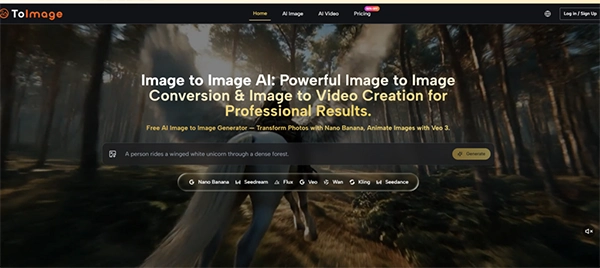
People fuss over which AI image tool to use: Midjourney or Stable Diffusion? Over the years, the models may be becoming known for their unique styles, but when it comes to quality, each one is great.
So what difference is there in generic AI slop images going around the internet and the ones that don’t even seem like AI-generated but are? It’s mostly the prompt. How the prompter structured it, how detailed it was, did he/she use an AI prompt or just a one-liner? All of this makes the difference.
According to an Adobe survey, 77% of top AI creators believe descriptive keywords are the most effective way to prompt AI images.
The workflow has become easier with the Image to Image models. But people think that if a reference image has already been provided, the instructions don’t hold much value. That’s completely false. A prompt is equally important, as it must have been in a text-to-image workflow.
KEY TAKEAWAYS
- Compared to text-to-image, image-to-image models produce better outputs that align with your expectations.
- But that doesn’t mean prompts can be ignored. They are as important as in a text-to-image workflow.
- The more descriptive the instructions, the better aligned the output with your expectations.
- If you want professional-grade output from an AI image tool, adopt the image-to-image workflow with descriptive prompting.
Table of Contents:
Why Image-to-Image Prompts Are Fundamentally Different from Text-to-Image Prompts
In a text-to-image model, the tool has to create visuals out of thin air (or should I say words). That places a heavy burden on description—you have to tell the AI what the subject looks like, what the setting is, what the lighting should be, and how all the elements relate to each other. Miss a detail, and the AI fills the gap with its own interpretation, which may not match your vision.
Image-to-image flips that dynamic. The source image provides the visual foundation. The AI can see the subject, the composition, the colours, and the existing mood before it even reads your prompt. Your text instruction, therefore, does not need to describe the entire scene from scratch. It needs to describe the change. This is a smaller, more precise job, but it is also a more delicate one. Because the AI already has a visual anchor, your prompt acts as a directional signal rather than a blueprint. Vague signals produce unpredictable turns. Specific, well-calibrated signals produce controlled, predictable results.
The Source Image as a Constraint That Focuses the Prompt
The presence of a base image changes what a good prompt looks like. In text-to-image, it’s expansive: it adds detail, context, and atmosphere. In image-to-image, a good prompt is often more surgical: it identifies what to keep and what to change. “Make it sunny” applied to a portrait might add a sun in the background but leave the lighting unchanged. The prompt “replace the overcast sky with a bright blue sky, add warm sunlight from the upper left, and keep the subject’s face unchanged” gives the AI a much clearer set of instructions. The source image already tells the AI what the subject looks like. The instructions tell the AI what to do with everything else.
Three Prompting Challenges That Tested the Workflow
I ran three tests to understand the exact relationship between instructions and output in an image-to-image workflow. Each task revealed something about how to write effective instructions and where the process can still go wrong.
Task One: Background Replacement with Lighting Consistency
The first task was straightforward in concept but tricky in execution: take a product photo shot against a plain white background and place it in a lifestyle setting—a kitchen counter with natural light, contextual props, and realistic shadows. The source image was clean and well-lit, which gave the AI a strong foundation. The challenge was the prompt. The first attempt was broad: “put this product in a kitchen scene.” The AI generated a kitchen background, but the lighting did not match the product—the product retained its flat, even lighting while the background had warm directional light. The result looked like a composite, not a photograph.
The second attempt was more specific: “replace the white background with a warm, sunlit kitchen counter. Add soft shadows that match the direction of light from the upper left. Keep the product’s shape, colour, and text exactly as they are.” This produced a noticeably better result. The AI adjusted the shadows on the product to match the new light source, and the integration felt more natural. The product text remained legible, though fine details on the label occasionally blurred in some generations. After two more rounds of refinement—adding “wooden countertop, ceramic bowl in the background, no visible branding”—the output was usable for a client mood board.
The lesson was clear: the source image provided the structure, but the prompt provided the direction. Broad prompts produced generic results. Specific, layered prompts produced results that felt intentional.
Task Two: Style Transfer While Preserving Composition
The second task tested the model’s structure preservation capabilities while it changes the style of the image. It involved transforming a sketch into a painting. The source image was simple line art with minimal shading. The prompt needed to communicate the desired style without instructing the AI to reinterpret the composition.
The first instruction was “turn this sketch into a digital painting.” The AI produced a painted version, but the proportions shifted slightly—the character’s face became narrower, and the pose lost some of its original energy. The AI had interpreted the sketch as a suggestion rather than a blueprint.
The second prompt was more precise: “render this sketch as a digital painting in the style of fantasy concept art. Preserve the original proportions, pose, and facial structure exactly. Add detailed shading, textured brushwork, and a moody colour palette.” This produced a much better result. The AI respected the original line art while adding depth, colour, and texture. The character remained recognisable, and the style felt coherent. The limitation appeared in more complex sketches with overlapping lines—the AI sometimes struggled to interpret ambiguous strokes, producing muddy areas that required a cleaner source drawing to resolve.
Task Three: Text-Aware Composition with Spatial Precision
The third task was the hardest: take a cityscape photograph and add a promotional headline, a subtle logo treatment, and decorative borders, all while keeping the background recognisable. This task tested the AI’s ability to handle spatial relationships and text rendering—two areas where generative models still struggle.
The first prompt was “add a headline that says ‘City Lights’ in the upper centre, a small logo in the lower right, and decorative borders on the sides.” The AI generated something that approximated the request, but the text was illegible, and the logo placement was inconsistent. The borders overlapped the image in awkward ways.
The second instruction was more structured: “add the text ‘City Lights’ in a clean sans-serif font, centred in the upper third of the image. Add a circular logo mark in the lower right corner, no larger than 10% of the image width. Add thin decorative borders along the left and right edges, keeping the central image area clear.” This prompt produced better spatial accuracy—the text was placed correctly, and the logo appeared in the right area—but the text itself was still often illegible or distorted. After several more attempts, the AI managed to generate clear text in about half of the outputs, but the results were inconsistent. For final deliverables, manual text overlay in a design tool would still be necessary.
How the Platform Supports Prompt Refinement
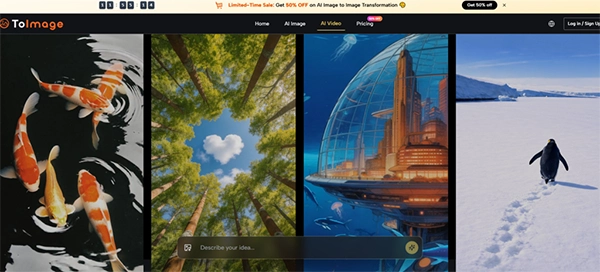
The interface is simple and intuitive when it comes to prompting. The generation panel keeps the previous instruction visible and editable without forcing you into a separate history view. This is a small detail, but when you are iterating through multiple variations of a single concept, the friction of re-entering prompts adds up quickly. The ability to tweak a phrase, regenerate, and compare results side-by-side speeds up the refinement process considerably.
The image history is also persistent across sessions. If you close the browser and come back later, your previous generations and their associated prompts are still accessible. This matters for anyone who has lost work after clearing a cache or switching devices. It also matters for prompt development—being able to look back at what worked and what did not is essential for learning how to write better instructions.
What the Testing Revealed About Prompting
The testing revealed a clear pattern: the quality of the output is heavily influenced by the quality of the instruction. Vague instructions produce vague results. Specific, descriptive instructions produce results that are more likely to match the user’s intention. This is not unique to this platform—it is true of all generative AI—but the image-to-image workflow makes the relationship between prompt and output more transparent because the source image provides a constant reference point.
| Prompting Approach | Subject Retention | Style Accuracy | Edit Precision | Iteration Efficiency |
| Broad, one-line | Medium | Low | Low | Low |
| Specific, descriptive | High | High | Medium | High |
| Structured, layered | High | Medium | High | Medium |
Broad prompts produced outputs that often drifted from the intended direction. Specific prompts produced outputs that respected the source image while applying the requested changes. Structured prompts—those that broke the instruction into clear components—produced the most precise edits but sometimes required more iterations to get right.
Strengths of the Prompting Workflow
This Image to Image AI enables non-linear edits. You can further edit the latest refinement of your image, or you can go back all the way to edit the base image. The editable prompt panel and the persistent history make it easier to experiment with different phrasings and approaches. This is particularly valuable for users who are still learning how to write effective prompts—the feedback loop is tight, and the cost of iteration is low.
Limitations of the Prompting Workflow
The platform does not offer built-in instruction guidance or templates. Users who are new to generative AI may struggle to craft effective instructions, and the learning curve is real. The results also vary between attempts, even with the same prompt and source image. This is inherent to the stochastic nature of generative models, but it means that achieving a specific vision may require multiple tries and selective curation.
Who Benefits Most from a Prompt-Focused Image-to-Image Tool
This is for creators who understand that AI is no magic. The more effort you put in, the better the output.
E-commerce teams that need to adapt product photography for different campaigns will benefit from the ability to refine prompts until the output matches the desired aesthetic. Designers who produce rough layouts and want to quickly visualise finished treatments will appreciate the structural preservation and the ability to experiment with different styles. Social media managers who need multiple variants of a hero image for different platforms can generate them efficiently without reshooting.
The platform is less ideal for users who expect perfect results on the first attempt. Generative AI is not deterministic, and the output quality depends on the instruction, the source image, and the model. For users who are willing to invest time in learning how to write effective prompts and who value a clean, uninterrupted workspace, the platform offers a practical and reliable solution.
Conclusion
In a field where generative AI often prioritises novelty over usability, the image-to-image approach with a strong emphasis on prompting stands out as a genuinely useful addition to the creative toolkit. It does not claim to replace the designer or the photographer. It claims to make their work faster, more iterative, and more exploratory—and on that promise, it delivers.
FAQs
Why do prompts matter?
How to create an image from a text prompt?
AI tools take seconds to generate an image. Just pick a platform, type the description of the visual you want, select ratio/style, and hit generate.
How do people perceive the images created by Generative AI?
If it looks evidently AI, people perceive the image to be prototypical, strange, and with a feeling of uncanniness.
Related Posts