Yes, Seedance 2.0 uses a dual-branch diffusion transformer to generate synchronized video and audio, including dialogue and ambient sounds, simultaneously.
Mastering Precision Video Synthesis With The Seedance 2.0 AI Architecture
POST BY
PUBLISHED
February, 17, 2026
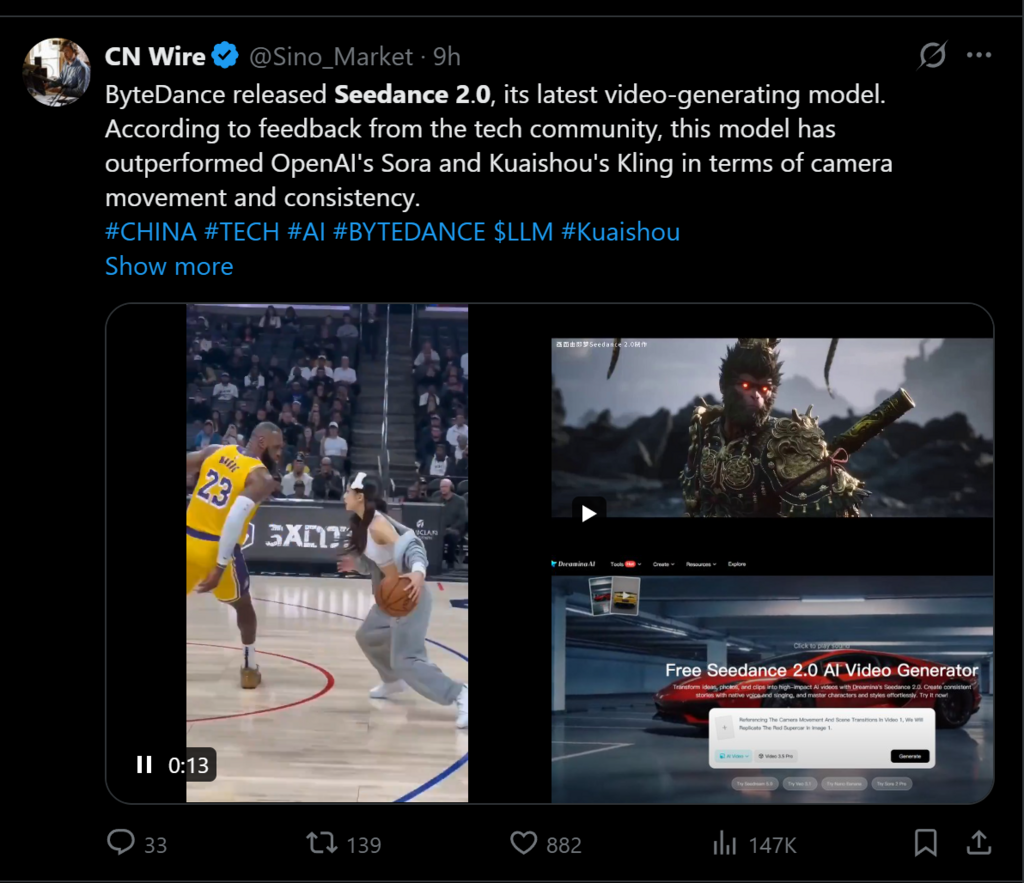
Generative media have gone from fun experiments to valuable production tools. However, credibility is still one of the biggest barriers. For creatives, the difficulty in replicating a specific outcome or achieving a consistent visual style throughout a campaign has made the first-generation video models difficult to use.
On February 12th, 2026, a major shift occurred with the launch of Seedance 2.0 AI. This artificial intelligence platform thoroughly changes how algorithms understand user intent by moving away from probabilistic generation to deterministic synthesis.
This provides users with the ability to set rigid limits around the final product by using a multi-modal reference. So they have an assurance that their final output will be created only from the visual and audio data that they provide, not from hallucination.
KEY TAKEAWAYS
- Consolidating fragmented media workflows into a unified production engine that eliminates stochastic noise and integrates native audio dynamics.
- Technical analysis of high-fidelity motion and visual consistency is critical for incorporating generative assets.
- Comparative evaluation of reference-based and prompt-based models based on their features.
Consolidating Fragmented Media Workflows Into A Unified Production Engine
The major value of this current marketplace is the ability to consolidate previously separate production tasks that could have been completed with three separate tools, which created inconsistencies during transitions between processes. By ingesting text, photos, video, and audio at once, the AI will determine how all four components work together before any pixels are generated.
Eliminating Stochastic Noise Through Multi-Reference Anchoring Systems
The core differentiator here is the “Reference-First” approach. Instead of relying solely on a text prompt that is open to interpretation, the system allows you to upload up to nine reference images. These images act as visual anchors, defining the geometry, lighting, and texture of the scene.
Testing has shown that by utilizing the model’s concrete grounding truth for every single frame of video, the “shimmering” effect associated with AI-generated video is greatly reduced. AI-generated video retains the rigidity of objects throughout the frame regardless of the camera motion.
Integrating Native Audio Dynamics For Seamless Lip-Sync Performance
An uncanny valley effect often results when audio synchronization has historically been a post-production afterthought. This model treats audio as a primary driver of motion.
By analyzing the waveform of an uploaded vocal track, the system modulates the facial geometry of the character in real-time. This native integration produces lip movements that are synchronized in time and matched in intensity to the speaker’s emotional tone, creating a far more convincing performance without manual keyframing.
Technical Analysis of High-Fidelity Motion and Visual Consistency
Beyond workflow consolidation, the raw technical output has seen a substantial upgrade. Moving beyond the compressed, the support for 2K resolution indicates a readiness for high-definition displays, low-resolution outputs that contributed to the previous generation of tools.
This jump in fidelity is crucial for incorporating generative assets into traditional video pipelines, where mismatched resolutions can break the visual continuity.
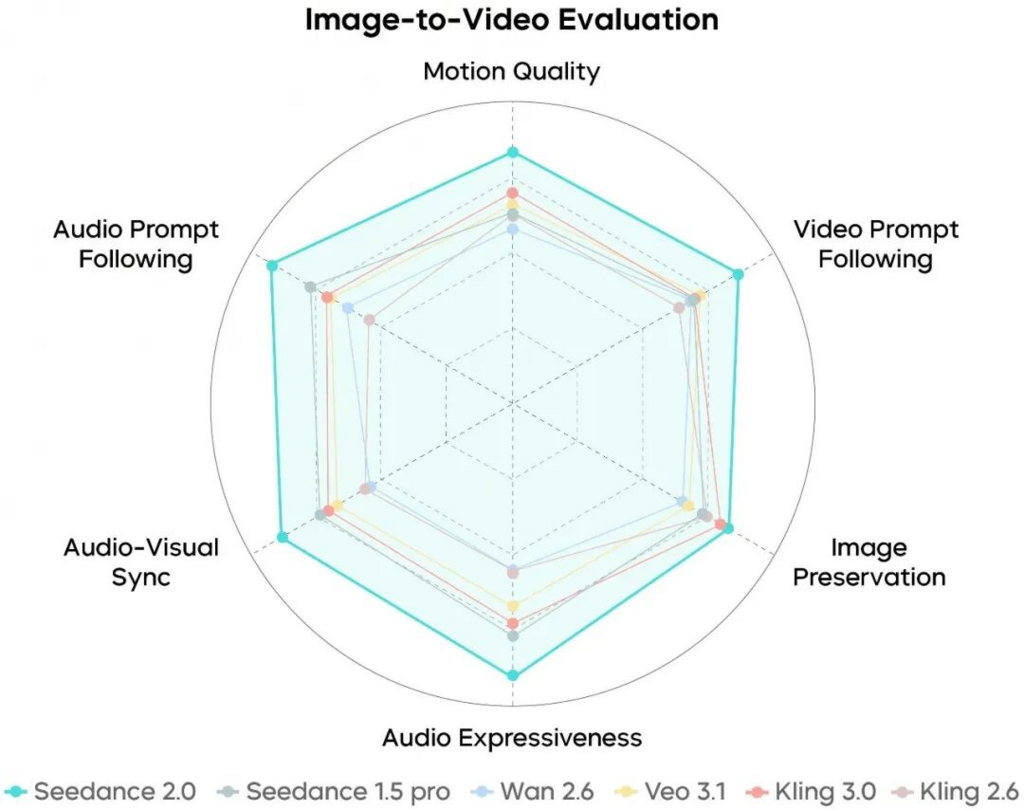
Benchmarking Resolution Standards And Cinematic Frame Stability
High resolution often exposes the flaws in generative video, particularly in background details. However, my observations suggest that this model utilizes advanced upscaling algorithms that preserve texture information even at 2K.
While the detailed information is frequently lost on highly chaotic scenes, such as rushing water or dense crowds, there is still a significant amount of consistent stability with static scenes, such as architectural structures and furniture, with this AI technology. Therefore, this technology allows the use of AI-generated videos alongside standard filmed footage in professional video editing applications.
Reviewing the Efficacy of Trajectory-Based Camera Control
One of the most powerful features for directors is the ability to dictate camera movement through reference videos. Rather than struggling to describe a “compound pan and tilt” in text, you can simply upload a rough clip demonstrating the desired motion.
The camera data from the reference video is extracted by the AI and then applied to generate your new scene. This allows anyone to gain access to high-end cinematography techniques without having to spend large amounts of money on traditional cinematography methods.
Comparative Evaluation of Reference-Based Versus Prompt-Based Models
The following table illustrates how the reference based system provides greater capabilities compared to a standard text-to-video model.
| Feature Set | Standard Prompt-Based Model | Seedance 2.0 AI Architecture |
| Control Mechanism | Text description only | Multimodal Reference (Image/Video/Audio) |
| Consistency | Low; character changes often | High; identity locked via 9 images |
| Audio Sync | None or external plugin | Native, waveform-driven lip-sync |
| Motion Logic | Random or basic pan/zoom | Trajectory mapping from video input |
| Resolution | Typically 720p/1080p | Native 2K High-Definition |
Operational Protocol for Executing Controlled Video Generation Tasks
To obtain professional-quality results from this platform, all users should adhere to the structured workflow developed by this platform. This process works linearly to ensure that the AI has enough specific data to accurately produce each scene.
Step 1: Uploading Core Visual and Auditory Reference Assets
The process begins in the asset management interface. Here, you must upload the specific images that describe your character and environment. It is critical to provide clear, high-contrast images for the best results.
Simultaneously, upload any video clips that serve as motion indications and the audio file if your scene involves speech. This step essentially builds the “cast and crew” for your digital production.
Step 2: Configuring Influence Weights and Prompt Logic
Once assets are loaded, enter your text prompt to describe the action. The nuance lies in the “Influence Weight” settings. You must assign a numerical value to each reference asset, telling the AI how strictly to adhere to it.
For example, set the character image weight to high if facial accuracy is paramount. In case of motion reference suggestion, set the video weight to low. This calibration acts as your directorial instruction.
Step 3: Generating Sequences and Applying Localized Refinements
After initiating the generation, the system will produce a preview. It is rare for a first attempt to be flawless. Utilizing the platform’s editing suite, you can select specific areas of the video to regenerate.
You can mask the area and ask for a new variation without changing the rest of the clip if a hand movement seems off or if a background element is distracting. This iterative refinement is the final step in polishing the asset for export.
Assessing The Practical Viability For Professional Commercial Applications
While the AI Video Generator Agent framework represents a massive leap forward, it is not without limitations. The time taken to generate content can be lengthy when working in high definition and in many formats.
Additionally, rendering objects that behave on a real-world basis can be a sizable challenge. Yet, for those wanting to simplify their workflows and gain the best control of their video productions (among other things), this tool is a great way to move from what you envision to what actually occurs on-screen.
FAQs
Does it support audio?
What is the maximum video length?
The current version supports generated video lengths up to 15 seconds.
What are the main input options?
You can use natural language prompts, up to 9 reference images, 3 reference videos, and 3 audio files per generation (12 files total).
Is it suitable for professional, multi-shot videos?
Yes, it is designed for cinematic, multi-shot workflows where users can direct the AI to maintain consistency between scenes and shots
Related Posts