Yes, your networking profile is likely to get hacked after clicking on a suspicious link.
6 Tips to Maximize Your Social Media Accounts' Security
POST BY
PUBLISHED
March, 27, 2026
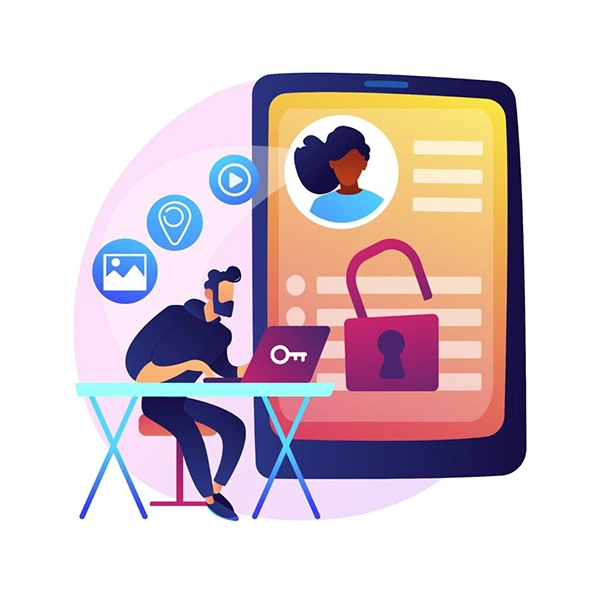
Your online profile is not safe, be it on Instagram, Facebook, TikTok, X, or even LinkedIn. The first platform is the most unsafe. Networking profiles are valuable assets in the present world. As a result, hackers have increased their attacks on them. Research proves this, with 73% of users experiencing a breach at least once.
Interestingly, we can protect our accounts if we pay a little attention to their security. After that, we can continue using them to watch and share meme reels and talk to our friends without any worry.
In this guide, I’ll tell you about how you can make your social media account hack-proof. The following sections list a few tested security measures that you can take to secure your networking profiles.
KEY TAKEAWAYS
- Ensuring social profile security is important as hackers increase their attacks.
- Use a secure internet connection along with a VPN.
- Enable 2FA in addition to setting strong passwords.
- Never share personal information online with anyone, and keep social apps updated.
How to Keep Your Social Media Accounts Secure
Some basic habits can protect your networking handles from getting hacked.
Use a Secure Internet Connection
The Internet connects us to social platforms, but hackers are also lurking around in the same place, hoping to creep in as you let your guard down, even remotely.
Several internet service providers (ISPs) offer secure internet connections. Personally, I’ve subscribed to the Xfinity Internet Plan. It offers symmetrical speeds, i.e., similar upload and download speeds, and importantly, the ActiveArmor.
ActiveArmor can instantly notify me in case it detects any malicious activity, such as a data breach. Plus, it also runs frequent network checks to detect and block viruses. So, it’s extremely important to use a secure connection to ensure that no malware or virus can enter your device. This usually ends in hacking of networking accounts.
Set Strong Passwords
This one’s a no-brainer. Even platforms force you to set a strong password when you create the account.
While it’s not the ultimate defense against hackers, setting strong passwords can surely make them work hard and spend time or resources to crack them.
A strong password combines small and uppercase letters, along with alphanumeric characters. Also, don’t set birthdays, pet names, addresses, etc., as your passwords. These are really easy to guess for those hackers.
It’s also a good habit to change your password after a few months. And, you might not want to use the same password for every social media account. It’s because if that password gets leaked, it automatically puts all your online profiles at risk.
Use a Virtual Private Network
Think of a virtual private network (VPN) as an encrypted, secure way that connects your device to the networking platform server. All the data, whether it’s coming into your device or going out, goes through this tunnel, is filtered out, and then heads to its destination.
Additionally, a VPN also changes your device’s original IP address and assigns it a fake one. And while you won’t become anonymous on the internet, the altered IP address will stop hackers from pinpointing your device and installing malware or a virus on it.
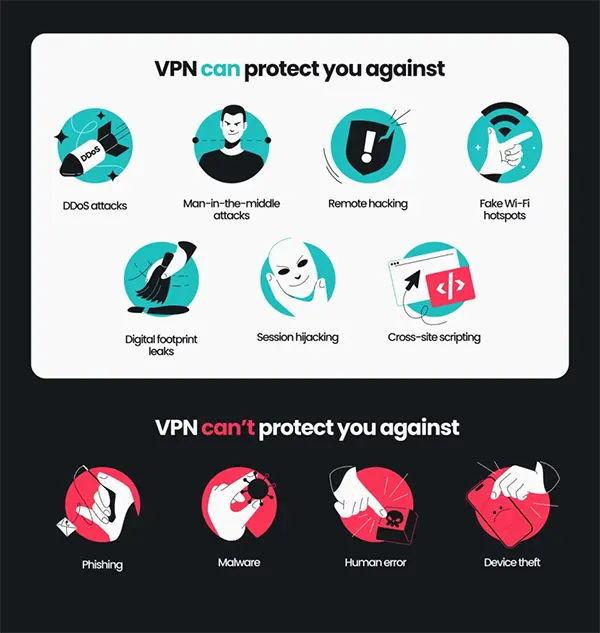
But VPNs don’t protect you from all types of attacks. The following infographic illustrates that:
Never Share Sensitive Information
Some smart hackers don’t waste time guessing and brute-forcing your password. They simply ask the target for it, and you’ll be surprised, they tell it to the attacker. All of this involves a clever lure, of course.
They reach out to people in different ways, such as emailing them or direct messaging them on a social media account.
Hackers also try to gain their victims’ trust first before playing their cards. This way, once people start trusting them, they ask for sensitive information and exploit it as soon as they get their hands on it.
So, it doesn’t matter how trustworthy a person seems; never share any crucial piece of information.
Use Two-Factor Authentication
Two-factor authentication (2FA) is simply double-checking the authenticity of the individual logging into an account. In conjunction with the traditional password, this further strengthens your online profile’s security. Generally, we only require an email address and a password or a PIN to log into our networking profiles.
However, when you enable 2FA, you usually receive a code via SMS to your smartphone or by email. And only when you enter that code can you log in to your social media account.
Also, 2FA is particularly helpful if your password gets leaked somehow. 2FA will ensure that no unauthorized person can access your account without entering the code first.
Keep Your Social Media Accounts Updated
The apps on our phones are constantly updated. These updates don’t just add new functionalities and features, but also improve the security of the app.
They need to be installed as soon as you receive them. Such software updates can enhance the platform’s safety, fix the existing security loopholes, and improve the overall app.
Now you know almost every measure that you need to take to improve the security of your networking account.
Be social. Be secure. Keep the hackers away!
Frequently Asked Questions
Can my social media account get hacked by clicking on a suspicious link?
Can I access my social account on public WiFi?
Yes, but connect to a VPN first before accessing your online profile on a public WiFi.
What is the best way to improve social media account security?
Enable 2FA while having a strong password.
Related Posts