Ans: To properly use a VPN, first install the VPN on your device and log in using your credentials. After that, you can pay for the subscription and then connect to the VPN’s servers.
How to Use VPN? Learn The Basics of VPN Technology
POST BY
PUBLISHED
June, 17, 2025
Everyone knows what a VPN is, but struggles with how to use VPN to protect themselves on the internet. Those online ads you have seen about the effectiveness of VPNs are all true, a VPN does have the capability to encrypt your internet traffic and hide your online location. All these benefits will make it worthwhile to learn how to use VPN.
In the digital age, it is important to protect yourself online, so your identity does not get stolen by a hacker. If you are up to learn something new, join us in this guide about using a VPN and taking all the right steps to ensure online security.
Table of Contents:
How to Use VPN?
Using a VPN can guarantee online protection and help you surf the world without having to worry about cybercrimes. Here’s how you use a VPN and claim privacy and shield while browsing.
1. Choose a Reliable VPN Provider
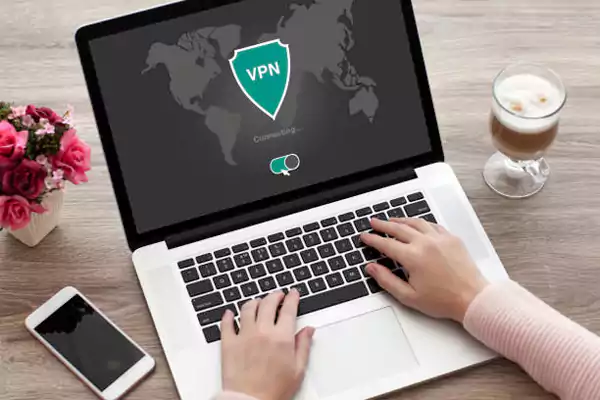
Before doing anything, you first need to choose a reliable VPN to handle your data and protect you against the dangers of the internet. There is no shortage of VPNs online, but you will be surprised to know how ineffective they can be.
You can even find free VPNs, but you should first do proper research, as many free VPNs are known to sell your private data. Premium VPNs like VPNEER, NordVPN, Surfshark, and ExpressVPN are some of the most well-known and trusted VPN on the market, and they are said to be the right choice when it comes to protecting yourself.
2. Download the VPN and Subscribe to it
After choosing a VPN for yourself, you need to subscribe to its services and download the app on your device. Most VPNs offer a monthly subscription price, so be prepared to make a purchase. After subscribing to the VPN, you can download the app and access its features.
3. Log in to the VPN Using Credentials
Before you use a VPN, you need to set up the app by logging in using your credentials. Enter your credentials like email address, name, age, etc, to fully set up the VPN and make it available for use.
Without a subscription first, you won’t be able to log in to a VPN’s server. Enter your username and password, and you will be able to change your server location.
4. Activate the VPN
Subscribing to the VPN, you are free to use it and connect to the servers. To activate the VPN, click on the “Quick Connect” option to change your server location and encrypt your internet traffic.
Most VPNs give you access to choose from multiple locations throughout the world, meaning you can change your server location to America or any other country. This helps users tackle geo-restrictions and access content that is not available in their country. Online gamers can also benefit from this feature and connect with players from another country.
Taking these steps, you will be free to roam the internet without any worries of getting hacked or your data leaked.
How to Choose a VPN?

Before you attempt any of the above-mentioned steps, you need to first do some research and choose the right VPN for you. With the multitude of options available, making the wrong choice is very much possible; that’s why you should consider all the important factors and filter out the software that doesn’t work for you.
Important factors for choosing the right VPN:
- Streaming and geo-blocking feature
- Torrenting and P2P sharing
- Strict no-logs policy
- Advanced encryption standards
- Kill switch feature
- DNS Leak protection
- Server size
- Bandwidth limit
- High-speed internet
- Specialized servers
- Multi-platform support
- Simultaneous connections
Any VPN with a healthy balance of the metrics mentioned above will surely do a great job at protecting you. As always, you should do proper research and go through online reviews to see how each VPN performs.
Keeping these things in mind will help you choose the right VPN.
How to Use VPN on Different Devices?
Using a VPN on different devices may seem like a challenge at first, but it can be easily done without any issues. Here is a brief step-by-step rundown on how to use a VPN on different devices:
Use a VPN on MacOS
These are the steps you can follow to use a VPN service on your Mac:
- Download the VPN app from the App Store.
- Open the app and pay for the subscription.
- Log in using your credentials to set up your account.
- Click the Quick Connect option to start the VPN.
Use a VPN on Android
Below are the steps for how to use a VPN on Android:
- Install the VPN app from the Play Store.
- Open the app and confirm your purchase.
- Set up your account using credentials.
- Tap the Quick Connect option to activate the VPN and encrypt your data.
Use a VPN on iOS
Below are the steps for how to use NordVPN or other premium VPN services on an iOS device:
- Head to the App Store and download the VPN.
- Open the VPN app and complete your purchase.
- Set up your account and click the Quick Connect option to use the VPN.
Use a VPN on Smart TV
You can follow the steps below to install and use a VPN on a Smart TV:
- Download the VPN app from the Play Store or the App Store.
- Log in using your credentials and set up your account.
- Click on Quick Connect to VPN servers and encrypt your internet data.
Use a VPN Through Browser Extensions
We have written the steps on how to use Opera Browser VPN and other services below:
- Go to https://chromewebstore.google.com/category/extensions.
- Search for VPNs.
- Pick a VPN of your choice and click on the Add to Chrome option.
- After installing the VPN, click on its icon.
- Select the quick connect option to connect to servers.
Following these steps, you can protect all your devices with a VPN’s protective layer.
Final Thoughts
Why do you need a VPN? Having a reliable VPN on your side will always keep you protected on the internet. Knowing how to use VPN, you are now capable of staying hidden on the internet, getting rid of geo-blocks, and changing your location.
Moving forward, make sure to choose the right VPN for your needs and requirements so that you will stay satisfied with its services. You can also install a VPN on your internet router to protect all the devices in your home at once.
FAQs
Q: How do you properly use a VPN?
Q: How can I use a VPN for free?
Ans: You can download a free VPN to encrypt your internet traffic through secure servers for free. There are a lot of reliable free VPNs on the internet that you can trust.
Q: What is a VPN, and how to activate it?
Ans: VPN stands for Virtual Private Network, a software that encrypts your internet traffic through secure servers to protect you against the dangers of the internet.
Q: Does VPN really work for gaming?
Ans: Yes, using a VPN can be effective when gaming, as it allows gamers to connect with foreign gamers through specialized servers. Some VPNs have set out special servers just for gaming.
Q: Is it illegal to use a VPN for gaming?
Ans: No, it is not illegal to use a VPN for gaming in the USA, but it may be in countries like Iraq, Belarus, Turkey, China, Russia, etc.
Sources
Related Posts