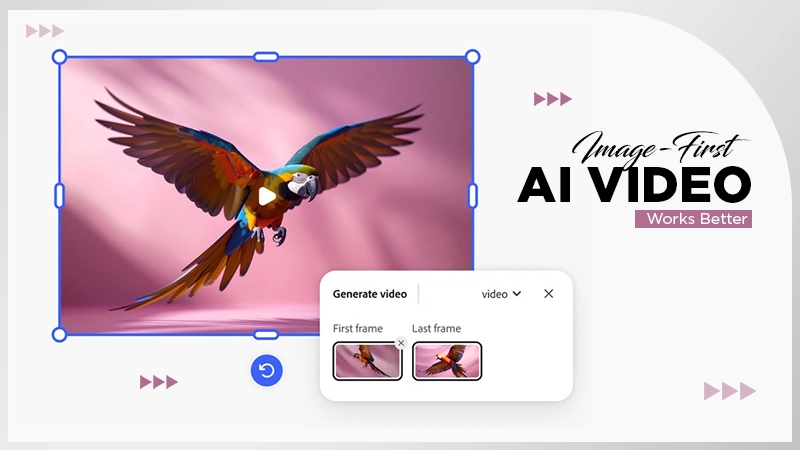
It is because generative AI is a statistical model designed to predict the most likely next word, and not exactly a mind reader.
From First Prompt to Polished Workflow: A Beginner's Realistic Guide to AI Video & Image Tools
POST BY
PUBLISHED
February, 12, 2026
KEY TAKEAWAYS
- Learn how the actual beginner’s cycle works (experimenting phase)
- Understand how to build a practical starter workflow
- Discover the common beginner pitfalls
Trying to make an AI image or video for the first time, but the results are far beyond your expectations, weird, blurry, too dramatic, or just completely off? And then you are sitting there thinking, “Am I bad at this, or is this thing just not listening?”
If yes, here is the thing: most beginners think AI magic happens in one perfect prompt. Let me make it clear, it doesn’t. There is a whole process behind it. You write something simple, see what it gives you, adjust a few words, try again, tweak again. That’s the workflow.
Nothing fancy. No secret coding skills. Just small improvements that turn a basic idea into something amazing, and doing this with AI tools like Banana Pro is a great experience. Let’s dive in and discover how, with stress and more experimenting, you can get the results you are wishing for.
Dispelling the “Instant Expert” Myth
The biggest challenge for newcomers isn’t the technology—it’s overly optimistic and unrealistic expectations. We see polished final products online and simply decide that’s the first draft. But in most cases, the reality is that its AI image generation, at its best, is a collaboration. You are the exceptional creative director; the AI is an incredibly quick, sometimes literal-minded, production artist.
Just think of tools like the Banana Pro AI Image Generator, not as autonomous artists, but as powerful renderers of your underlying intent. The gap between what you imagine and what you get is filled not by AI magic, but by your enhanced skill in giving proper direction. This converts the goal from “getting a perfect image on the first attempt” to “learning how to communicate visually.”
The Beginner’s Cycle: Uncertainty, Experimentation, and Adjustment
My own early days with AI image tools were humbling. I’d enter “a powerful eagle over a mountain” and get a bird with three wings over something looking like a molehill. The key lesson? Specificity is your new best friend. This is where the actual learning starts.
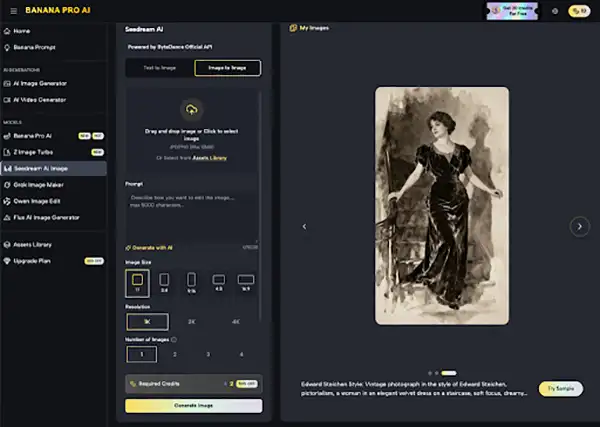
Banana Pro AI, for instance, offers both Text to Image and Image to Image functions. This duality is perfect for the experimental phase. You can simply begin with the text, and come up with a rough idea, and then just use that picture as a new beginning point to refine and steer the outcomes. It’s a tangible way to see how small changes in input create significant changes in output.
The process isn’t linear. It’s an actual loop:
- Prompt with your best guess.
- Analyze what the AI did right and wrong.
- Adjust your language or utilize an image for reference.
- Repeat.
This cycle of trial-and-error is not failure; it’s a very important training ground for understanding the AI’s “language.”
Building a Practical Starter Workflow
No, you don’t actually need a complex system to start with. Start with a simple, repeatable process that focuses on learning. Here’s a simplified framework you can adapt:
Phase 1: Ideation & Simple Prompting
Start with a clear but easy concept. Instead of “a cool logo,” think “a minimalist fox head icon, single color, on a white background.” Utilize basic prompt format like: Subject, Detail, Style, Setting.
I found that starting with the style presets available in many tools, like those offered by Banana Pro AI Image Editor functions, gave me a crucial anchor. Choosing “cinematic” or “watercolor” before I even wrote a word helped set clear boundaries for the AI and taught me stylistic keywords.
Phase 2: The Power of Iteration & Refinement
Keep in mind that your first result is a conversation starter, not the final draft. Use it. If the colors are off, specify “muted pastel colors.” If the composition seems a bit weird, request “a wide-angle landscape shot.” The Image to Image feature in Banana Pro AI is invaluable here. Now here simply upload the result you get earlier and then add new commands like “make the lighting golden hour” to see direct, controlled evolution.
Phase 3: Integration into Your Real Projects
Start small in your real work. Utilize AI to generate:
- A distinctive header image for a blog post.
- Visual concepts for a mood board.
- Variation of product in various settings. This is where the commercial usage rights of a platform matter. Knowing you can legally use what you create, as you can with Banana Pro AI, eliminates the major obstacle for beginners wanting to apply their new skills to real client or personal work.
Common Beginner Pitfalls (And How to Avoid Them)
Walking into a few predictable traps is a rite of passage. Here’s what to look out for:
- The Vague Prompt Trap: “Beautiful landscape” produces generic results. Elaborate and specify the prompt “Alpine meadow with wildflowers, snow-capped peaks in background, dramatic sunset, Ansel Adams photography style.”
- Overcomplicating Too Soon: No, don’t begin by simply trying to produce a complex comic book panel with six characters. Master a single portrait or object first.
- Ignoring the Input Tools: If you have a rough sketch or an existing image that’s almost right, use it. The Banana Pro AI Image Generator’s upload function is a simple yet useful shortcut for alignment.
- Expecting Photographic Perfection Every Time: Keep in mind that AI is generative not an actual camera taking photos. It interprets. Embrace its sometimes artistic, interpretive nature as a feature, not a bug.
Shifting from Cost Center to Creative Partner
The most profound shift for me wasn’t just speed—it was a change in creative bravery. In a traditional workflow, asking for “ten different concepts” of an illustration is a costly, time-intensive request. But with AI tools, it’s hardly a60-second experiment.
This changes how you brainstorm. You can explore artistic directions you’d never commission due to budget. You can generate a watercolor version, a cyberpunk version, and a vintage poster version to see what resonates. Now, this specific descriptive phrasing time, which used to be a luxury, is now a practical step. The free access of a tool like Banana Pro AI makes this exploratory mindset risk-free, which is crucial for beginners finding their voice.
The Path Forward: Gradual Improvement, Not Overnight Mastery
Adopting AI image generation is less like learning a software manual and more like learning to brief a new team member. It requires clarity, patience, and a willingness to guide.
Your progress won’t be marked by a certificate, but by tangible moments: the first time you craft a prompt that gives you exactly what you envisioned; the time you save by generating a perfect background instead of searching stock sites for hours; the confidence you gain knowing you can create a unique visual for any idea that pops into your head.
Begin with curiosity, not pressure. Embrace the weird early results as learning data. Use the free, accessible tools at your disposal to experiment without fear. The goal isn’t to replace your creativity, but to augment it with a remarkably capable, always-available collaborator. Start simple, be specific, iterate relentlessly, and watch your visual communication skills grow in ways you never expected.
FAQs
Why doesn’t my first AI prompt give perfect results?
Do I need technical skills to use the AI video and image tool?
No, you don’t need deep technical skills like coding or programming to use AI video and image tools.
What are the common mistakes beginners make with AI tools?
Some common mistakes include using overly vague prompts, expecting perfect results instantly, and failing to identify AI-generated output for accuracy.
Related Posts