For a clear input file size, the maximum file size needs to be around 5 MB. To achieve this, compressing can be used.
High-Fidelity Asset Management With AI Compositing
POST BY
PUBLISHED
January, 27, 2026
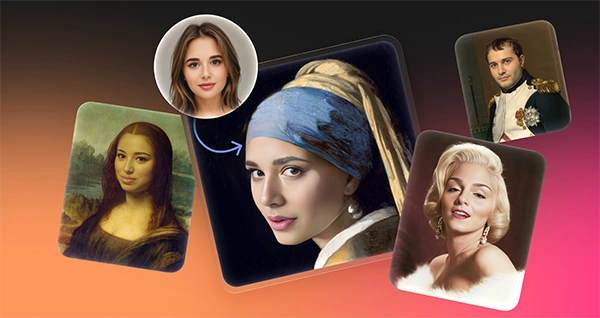
Do you remember the times when normal photo editing used to take hours of complex tools? That vague process from lasso tools to finding the right fit for the tone of the face to match. Even after making more than enough efforts, the results were usually not satisfying. Thanks to the contribution of AI composting.
With tools based on AI composting, such as Face Swapper, there is no more need of manual pixel adjustments—this will be led by algorithm generation. For professionals in the industry, the next question that arises is how to use it responsibly in real situations while being behind the line of quality.
Keep reading this article that shares how high fidelity asset management integrates with AI compositing to provide high finished images with minimum manual efforts.
Scenario A: Localizing Marketing Assets
Global marketing campaigns often hit a hard wall: localization. You might have a high-quality campaign shot featuring a model that pairs perfectly with a North American audience. But the client needs the same campaign to feel native to an East Asian or Southern European market. Reshooting destroys budgets.
Designers start with the “Target” image in this workflow. Lighting, composition and wardrobe remain approved. Only the facial features need to shift to fit the target demographic.
Drag the campaign image into the Face Swapper interface. JPG, PNG and WEBP formats work fine, provided the file stays under 5 MB. Once the target loads, select a “Source” face. Use the tool’s built-in gallery, which includes AI-generated faces and photostock models, or upload a custom file.
The swap executes. The core technology doesn’t just copy-paste. Instead, it generates a new set of pixels “in between” the source and the target. Lighting, skin texture, and head angle from the original campaign photo stay intact. The facial structure adjusts to the new generation.
Expect a 1024px output.
For digital campaigns, social media ads, or web banners, this resolution works. Download the result. Run it through the integrated Smart Upscaler if a larger print format is required. The asset is ready for the localized market. You save thousands in production costs while maintaining strict brand consistency.
Scenario B: Anonymizing Sensitive Content
Privacy protection offers a surprisingly valuable use case for ai face swap technology. Healthcare providers and legal firms often need candid photos of their facilities to show authenticity. Stock photos feel fake. But strict privacy regulations like HIPAA or GDPR prevent showing real faces of patients, staff, or bystanders.
Blurring faces or placing black bars over eyes provides a vague look to the images while ruining the aesthetic. Marketing materials end up looking like evidence photos.
“Multiswap” solves this problem. Upload a group photo of the facility. The tool detects multiple faces within the single frame. Rather than swapping them manually one by one, assign different AI-generated faces to each person.
Swapping real faces with non-existent, AI-generated identities preserves the human element. Smiles, engagement, and diversity remain visible. No one’s actual identity gets exposed. Because the tool preserves the original expression and head pose, the honest nature of the shot remains there. The user base for this workflow expands beyond designers to include compliance officers needing to sanitize visual data fast.
A Quick Fix: The Corporate Headshot
Speed matters. Picture a typical Tuesday morning task for a social media manager – filled with to-dos.
A folder of photos from a company event lands on your desk. The CEO wants a group photo posted to LinkedIn immediately. The lighting looks great. Everyone looks sharp. Except for the VP of Sales, who is mid-sneeze in the best shot.
Find a different photo from the same event where the VP looks normal. Open Face Swapper in your browser. Drag the “sneeze” photo into the main window. Click to add a source photo and upload the “good” photo of the VP.
Processing takes moments. The system maps the open eyes and neutral expression from the source onto the body and head angle of the target. Check the preview. The sneeze is gone. A smile matches the lighting of the group shot. Download it. The post goes live before lunch.
How It Stacks Up Against Alternatives
Understanding market positioning helps manage expectations compared to other methods. Once a clear analysis is done, there will be no issues while deciding which tools to use –
Vs. Manual Photoshop Compositing
Photoshop offers ultimate control. Manipulating a face at 4000px resolution for a billboard still requires it. But manual compositing demands high skill to match skin grain and lighting. Face Swapper automates the blending. It lacks the layer-by-layer control of professional software but wins on speed for web-quality assets.
Vs. Mobile Apps (Reface, FaceApp)
Mobile apps target entertainment. They often aggressively compress images, add watermarks, or struggle to keep output resolution high enough for professional use. Face Swapper focuses on the “prosumer” market. It delivers 1024px output-significantly sharper than most mobile app exports-and handles browser-based batching. Doing that on a phone is clumsy.
Limitations and When to Avoid
Every tool has constraints, using which will not only confirm that your photos are of high quality, but also ensure that you are not crossing any unusual limit. Know them before committing to a workflow –
Extreme Angles and Obstructions
Marketing materials claim versatility, but reality is nuanced. The AI struggles with 3/4 head positions or faces that are partially blocked. Hands over mouths, thick-rimmed glasses casting shadows, or face masks often confuses the algorithm. Expect artifacts or a “smudged” look where the obstruction meets the new face.
Print Production
Screens love 1024px. Large-format print does not. Designing a full-page magazine ad or a trade show booth backdrop requires higher resolution. You will need significant post-processing using an upscaler to make this work for print.
Batch Performance
Batch processing works without strict upload limits, but performance degrades with volume. Swapping faces on 5,000 images will lag the browser-based interface. Industrial-scale processing requires an API subscription.
Practical Tips for Best Results
Mastering the algorithm improves output quality. These tips will make you efficient in different types of editing. Here are the most popular ones –
The Skin Beautifier Hack
Smooth skin without changing identity using this documented trick. Upload your target photo. Then, for the source photo, upload the same image. The AI maps the face onto itself. It regenerates the skin texture, acting as a pore-smoothing filter while keeping features identical.
Matching Head Shapes
Blending works best when the source and target share similar head shapes. Mapping a very wide face onto a very narrow head creates irregular jawlines. Watch the geometry.
Privacy Management
Sensitive client images require care. Use the history feature to re-download past swaps without incurring GPU costs again. Clear the history manually once the project finishes. Images auto-delete after two months, but manual deletion ensures client security immediately.
File Prep
Clean input files matter. The max file size is 5 MB, so compress raw photos before uploading. Keep the face area sharp. Regardless of the quality of the target image, the AI produces a blurry output when given a blurry source image.
Understand these parameters. Add this tool to your stack. Tasks that took hours now take minutes.
Conclusion
High fidelity asset management integrated with AI compositing can save you hours of manual editing, including setting the tone of the facial colours. For matching facial shapes, managing privacy and filing prep – it is the most widespread choice that allows even moderate editors to achieve professional editing in less time. Just ensure not to choose extreme angles and obstructions.
AI compositing can help you achieve professional level editing in just a span of moments.
FAQs
What is the maximum limit of file size for a clear input?
Why are AI compositing tools used the most?
The most popular reason for using AI compositing is matching the colour of the skin.
Will the interface differ on different screens?
Yes, usually just the resolution is changing, but many times, features also change when switching to mobile from laptop.
Related Posts