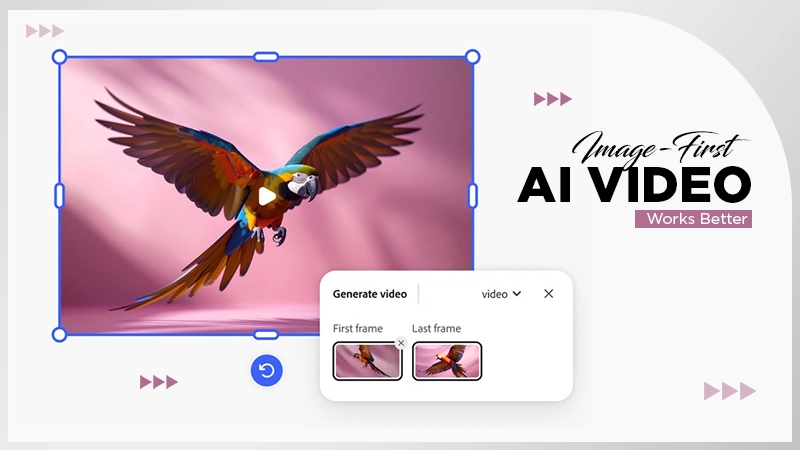
An AI image editor digitally alters images according to the user’s text prompt and is capable of adding various effects to them using its tools.
How to Choose the Best AI Image Editor
POST BY
PUBLISHED
April, 2, 2026
There are simply a great many options of image editors on the internet in today’s time. All have almost similar tools and not widely different results. So, how does one find the best AI image editor amongst so many other alternatives?
Some software focuses on speed, others emphasize personalization, and a few try their hand at everything, making it harder to make a definite choice.
The key to finding a perfect option for you is how each tool fits into your workflow. This guide will break it down clearly, so you can decide with confidence.
How AI Headshot Technology Has Improved
Not long ago, getting a professional headshot meant booking a photographer, scheduling a shoot, and waiting days—or even weeks—for results.
Now, the process looks very different.
Modern tools can generate realistic headshots from a single image in under a minute. Improvements in facial recognition, lighting simulation, and texture rendering have made outputs far more convincing than earlier versions.
What’s unique is its accessibility. A user doesn’t need prerequisite knowledge of technical skills or money for expensive software anymore. Even first-time users can go from upload to download in just a couple of steps.
What Makes the Best Tool in This Space
Choosing the best option comes down to how well it fits into your workflow. Most differences fall into a few key areas:
Speed
Some tools follow a simple upload → generate → download flow. Others require prompts, credits, or manual adjustments.
Pricing and access
Free access varies widely. Some tools allow anonymous use, while others require registration before you can even try them.
Input simplicity
Uploading one image is very different from writing prompts or working with layered edits.
Output quality
Resolution and facial accuracy matter, especially for professional use.
Limitations
Every platform has trade-offs—whether that’s usage limits, fewer models, or inconsistent results.
Comparison Table
| HeadshotMaster | Photoeditorai.io | Pixlr | Deepai.org | |
| Generation speed | Upload → generate → download in ~1 min | Upload + prompt → generate via credits | Multi-step editing workflow | Upload → process via daily calls |
| Pricing / free tier | Fully free, no login | 10 credits anon + 10 registered; 2–4/use | Login → 50 credits; 5/use | Free daily calls; paid plan ~$5/month |
| Input requirements | Single photo upload | Image + Text prompt | Manual editing tools + assets | Image upload only |
| Output quality | Baseline likeness from input | Up to 4K output | Up to 720p (free tier) | Up to 720p |
| Key limitations | Occasional distortions; no fine controls | Credit-based usage limits | Login required; limited free resolution | Single model; limited controls |
Competitor Breakdown
Every platform has different pros and cons, with tools that make all of them different in a way. Let’s analyse these technical aspects.
Photoeditorai.io
Photoeditorai.io follows a prompt-based flow where you upload an image, add a natural language instruction, and generate results using credits. Anonymous users start with 10 credits, and each generation uses 2–4 credits. Registering adds another 10 credits.
The platform supports multiple models, with most available on the free tier. Output can reach up to 4K resolution. This workflow suits users who want to guide edits more precisely through text prompts.
Pixlr
Pixlr operates more like a traditional editing suite, combining AI tools with manual features such as layers and background removal. Access requires registration, and free users receive 50 credits, with each use costing around 5 credits.
The platform has a strong foundational user base and huge mobile adoption. Free-tier output is capped at max 720p. This setup is perfect for users who prefer a hands-on editing process rather than a fully autonomous flow.
Deepai.org
Deepai.org provides a straightforward experience focused on accessibility. You upload an image and process it using a basic editing model, with no account required for initial use.
Daily usage is limited but resets automatically. Registered users receive a higher limit, and a paid plan (around $5/month) increases usage further. Output resolution is 720p, and only a single model is available. This approach works well for quick, occasional edits.
Fun Fact
AI can now process hundreds of photos at once to match skin tones, lighting, or remove backgrounds automatically.
HeadshotMaster
If you’ve ever needed a headshot quickly but didn’t want to create an account or deal with setup steps, this is where HeadshotMaster fits naturally.
Who it’s for
The experience is built around simplicity. You upload a photo, generate the result, and download it—without signing up or navigating a complex interface.
Using an AI Photo editor like this keeps the process direct and easy to follow.
What the workflow looks like
- You upload a single image.
- The system generates a headshot in about a minute.
- You download the result immediately.
There are no prompts, credits, or onboarding steps to manage.
Where it performs well
- Accessibility is the main advantage. You can use it completely free, without logging in or entering payment details.
- Speed is another strength. The process moves quickly, making it practical when you need fast results.
- The output generally maintains a strong resemblance to the original image, which works well for common professional use cases.
Where it has limitations
The simplicity comes with trade-offs. There are no fine-tuning tools or advanced editing controls.
Sometimes, the results may include minor inconsistencies, especially if the original image is not of good quality. The outcome is basically heavily dependent on the user inputted photo.
There are also no verified third-party reviews on platforms like Trustpilot or G2, so external validation is limited.
Who Benefits Most
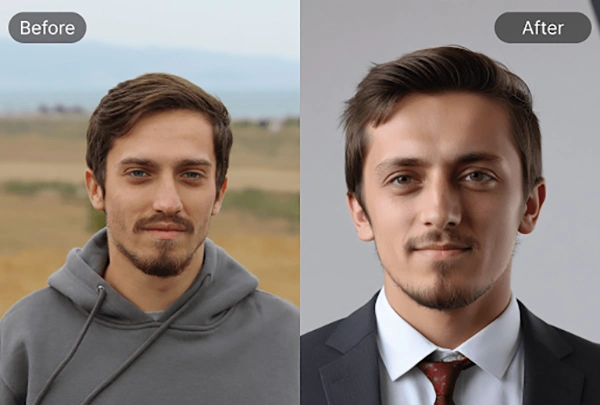
Most people aren’t looking to learn a full editing workflow just to get a usable headshot. That’s usually the friction point.
For quick updates—like refreshing a LinkedIn profile or adding a photo to a resume—a simple upload-and-generate flow feels far more practical. Tools that behave like a one-step AI Image/Photo editor remove unnecessary steps and make the process feel almost effortless.
HeadshotMaster fits well in those situations. It works for job seekers, freelancers, and anyone who needs something fast without committing to a platform.
At the same time, various workflows suit different needs. Some users prefer experimenting with AI text prompts and their latest models, while others want more control through manual tools. And for lightweight, occasional use, simple platforms with daily limits are enough.
A common realization: generating the image is easy. The harder part is choosing the tool that matches how you actually work.
Conclusion
The best choice depends on your priorities and workflow.
- If you want prompt-based control and higher-resolution output, Photoeditorai.io fits that approach
- If you prefer hands-on editing with layers, Pixlr offers that flexibility
- If you want simple access with daily limits, Deepai.org provides that option
- If you want a fast, no-login process, HeadshotMaster aligns with that need
And if you want to go beyond headshots—like adjusting outfits—you can explore tools such as an AI Clothes Changer for additional flexibility.
At its core, HeadshotMaster stands out for allowing full access without requiring an account or payment.
FAQs
What does an AI image editor do?
Is there an image editor that doesn’t require any payment or account creation?
HeadshotMaster is an AI image editing tool that allows full access to its services without requiring an account or payment.
Can AI editors transform a static image into a video?
Yes, but that functionality depends on each tool. Some provide these features, and others do not.
Can an editor generate the output in 4K?
Photoeditorai.io allows the resulting image to be obtained in 4K quality.
Related Posts